
DEFINE THE JOB
What counts as meaningful traffic?
A meaningful visitor is someone whose problem, location and needs could fit what you offer. Analytics can show useful signals; it cannot establish all of that about every visitor. Confirm fit through enquiries and conversations.
| Signal | What it tells you | What it does not prove |
|---|---|---|
| Search impression | Your page appeared in search. | Someone visited. |
| Website session | A recorded visit occurred. | A unique person or a potential buyer. |
| Engaged session | The visit met your analytics engagement definition. | The person wants your service. |
| Completed enquiry | A real request reached your inbox or CRM. | It is suitable or will become a sale. |
| Qualified enquiry | The request matches your service and agreed criteria. | A confirmed booking or revenue. |
For your first test, choose one completed action: an enquiry, a booked call, or a voluntary signup for a useful resource. Record known owner visits and test submissions separately. Leave missing data as “unknown.”
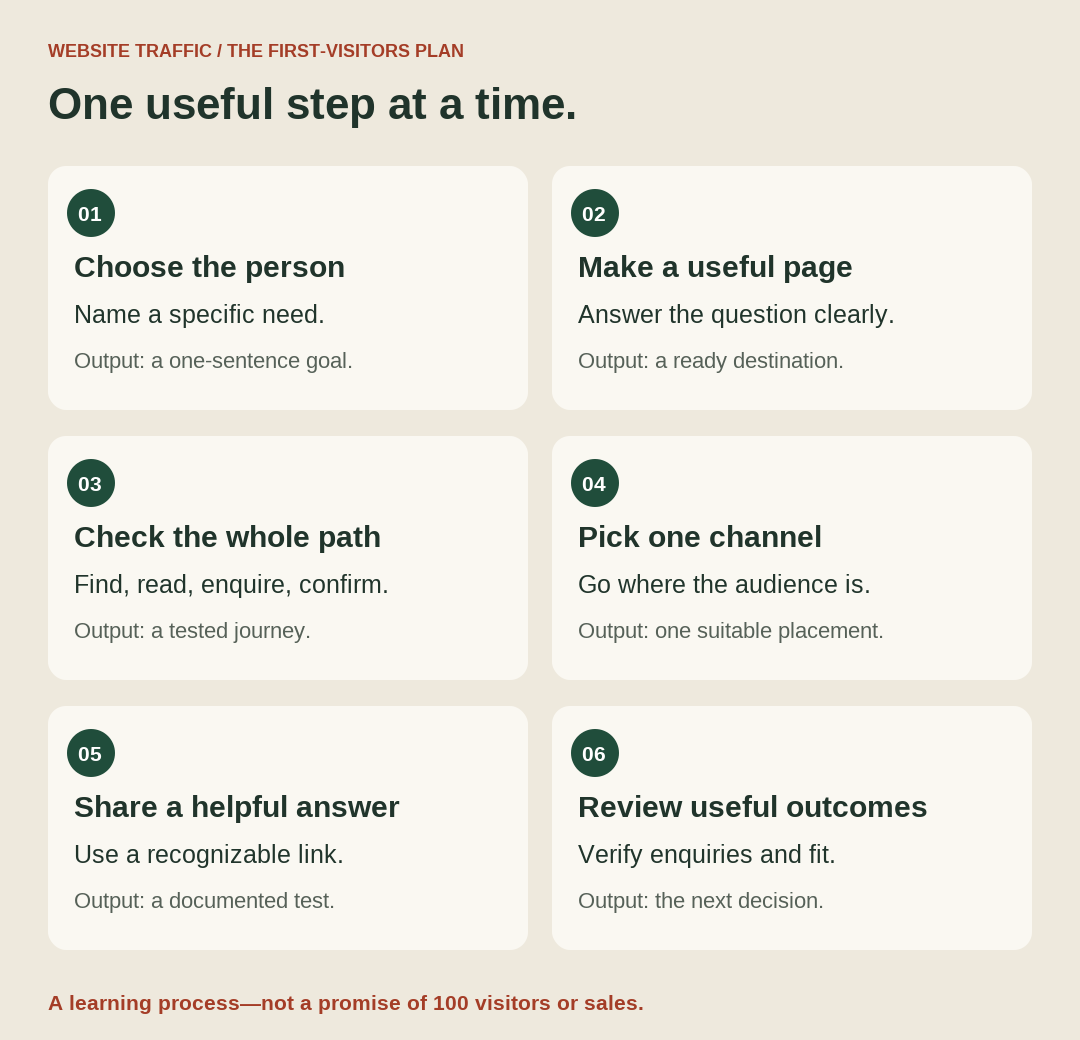
01 / CHOOSE
Name one person and one pressing problem.
Start with what people ask before buying. Use past enquiries, conversations or questions in a relevant community. If you have no customers, talk to a few people who might need the service and write down their words.
- Choose the audience you can realistically help.
- Name the situation that makes help useful now.
- Pick one next action that fits that situation.
FICTIONAL EXAMPLE / LOCAL HOME ORGANIZER
“I help busy households in West Palm Beach organize a crowded pantry. My page answers what to prepare before a first session. The next step is a consultation request.”
Compare “organization tips” with “how to prepare for a pantry organizing session.” The second describes a more precise need. It is a topic hypothesis, not evidence of search volume or ranking difficulty.
Done when: you can write the audience, problem, page and completed action in one sentence.
02 / MAKE
Improve one page people will be glad they opened.
Use an existing relevant guide if you have one. Keep its URL when the purpose remains the same. Give the visitor the answer before asking for anything.
- Lead with a direct answer. Explain the first three things to do.
- Show the process. Add an original example, a real photo you can use, an annotated screenshot, or a checklist.
- Answer the decision questions. Who is this for? What should they prepare? What does the service include? What determines cost?
- Offer the next step. Use a specific label and explain what happens after the form is sent.
COPY YOU CAN ADAPT
Before your first pantry organizing session
Choose the pantry area you want to work on, note your daily frustrations, and keep frequently used items easy to identify. Ask your organizer what to prepare before buying storage products.
Next step: “Request a pantry-organizing consultation.” Explain your real service area, pricing process and response expectations. Use only details you can deliver.
Use a real project demonstration if available. A made-up example must be labelled, as ours is. Do not turn an AI-generated photo into supposed customer proof.
Done when: someone can read the page on a phone, understand the offer and complete the next step.
03 / CHECK
Make sure the page can be found—and the action works.
Do this before distributing the link. Otherwise you can spend your time sending people to a broken or confusing page.
- Open the public URL while signed out. Check that the main content loads and the form confirmation works.
- Link to the guide from your homepage or a relevant existing page using descriptive link text.
- Inspect the exact URL in Search Console. If it is excluded unexpectedly, investigate access, indexing directives and the selected canonical URL. Request indexing after fixing a problem; inclusion is not guaranteed.
- Give the page an accurate title and description. Include it in your sitemap. These help discovery and understanding; they do not guarantee a position.
- Verify your analytics uses the correct domain and property. Send one clearly labelled test enquiry, check its actual delivery, and confirm the success event is recorded once.
A click on “Request a consultation” is a useful intermediate signal. It is different from a delivered request. Keep those events separate.
For a deeper walkthrough, use the GA4 setup guide and Search Console setup guide. Google’s SEO starter guidance explains that search changes may take weeks or months to assess.
Done when: you have a working public page, a verified completion path and a recorded baseline—even if that baseline is zero or unknown.
04 / CHOOSE A CHANNEL
Start where you can reach the right people.
For a new service business without an audience, our first recommendation is one relevant community or complementary partner. Choose based on actual access and audience fit. Build your search foundation alongside this test, then assess search over a longer period.
| Your situation | A reasonable first test | Make the visit useful |
|---|---|---|
| You already have opted-in subscribers | One practical email | Answer one question and link to the matching page. |
| You know a complementary business | A shared resource or newsletter mention | Explain exactly why it helps their audience. |
| You participate in a relevant group | A helpful, permitted contribution | Put the useful answer in the post; link when welcome. |
| Customers search for a local service | A complete service page and accurate eligible business listing | Use your real coverage, contact details and work examples. |
| You already have search impressions | Improve the matching page | Answer the actual query and compare consistent periods. |
Do not open five new social accounts for this test. Pick one place you can contribute consistently. Paid traffic can be a later controlled experiment after the page, goal and affordable spending limit are clear.
Done when: you have named one channel, why the audience fits, and how you will reach it.
05 / SHARE
Share an answer, then offer the deeper resource.
Turn the page into three useful pieces over your test period: a practical tip, a worked example and a common mistake. Each should be helpful without requiring a click.
EXAMPLE COMMUNITY POST
“Preparing for a pantry organizer? Before buying containers, list what frustrates you about the space and which items you use every day. Ask your organizer what needs to stay accessible. I made a short preparation checklist with the next steps.”
Add the link only if the community allows it. Adapt to a real question; avoid repeated link drops.
If a suitable partner welcomes a resource pitch, explain who it helps, what is inside and why it fits their audience. Agree on sharing before assuming a placement. You do not need bulk outreach to run a useful first test.
Give each external placement a recognizable link.
Use the weekly plan and campaign-link builder. For example, a fictional partner newsletter might use:
https://example.com/pantry-prep?utm_source=local-partner&utm_medium=email&utm_campaign=pantry-prep&utm_content=checklistThe example URL wraps for readability; copy it as one continuous link. Use lowercase labels, test the finished link, and never include personal information. Do not add campaign tags to internal site links.
Use the same source, medium and campaign labels in your review. Google’s campaign URL guidance explains where these labels appear in Traffic acquisition. Labels help organize observed referrals; they do not capture every visit or prove causation.
Done when: you have a helpful message, a tested link, a placement and a review date.
06 / LEARN
Review the useful outcomes before chasing more visits.
At the end of the first week, inspect delivery and tracking. After your planned distribution period, review the same page, date range, source and goal definition.
- Count recorded sessions to the page and sessions containing the chosen successful action.
- Check delivered enquiries against your inbox or CRM. Remove known tests and duplicates from the business review.
- Classify the enquiries using simple criteria: correct service, actual service area and suitable need.
- Note what people asked or found confusing. Choose one improvement for the next round.
Google describes how to measure a specific lead form as a key event. Check that your event corresponds to the intended successful action. Raw event totals may include multiple events in a single session.
Done when: you have a short note: “We observed __. We still do not know __. Next we will __.”
A WORKED EXAMPLE / ALL NUMBERS ARE FICTIONAL
What a small first test could actually teach you.
A home organizer starts with no recorded prospective-customer traffic. She improves an existing pantry-preparation page, adds a clear consultation step and agrees a checklist placement with one local partner newsletter. The test runs for 30 days with no paid ads.
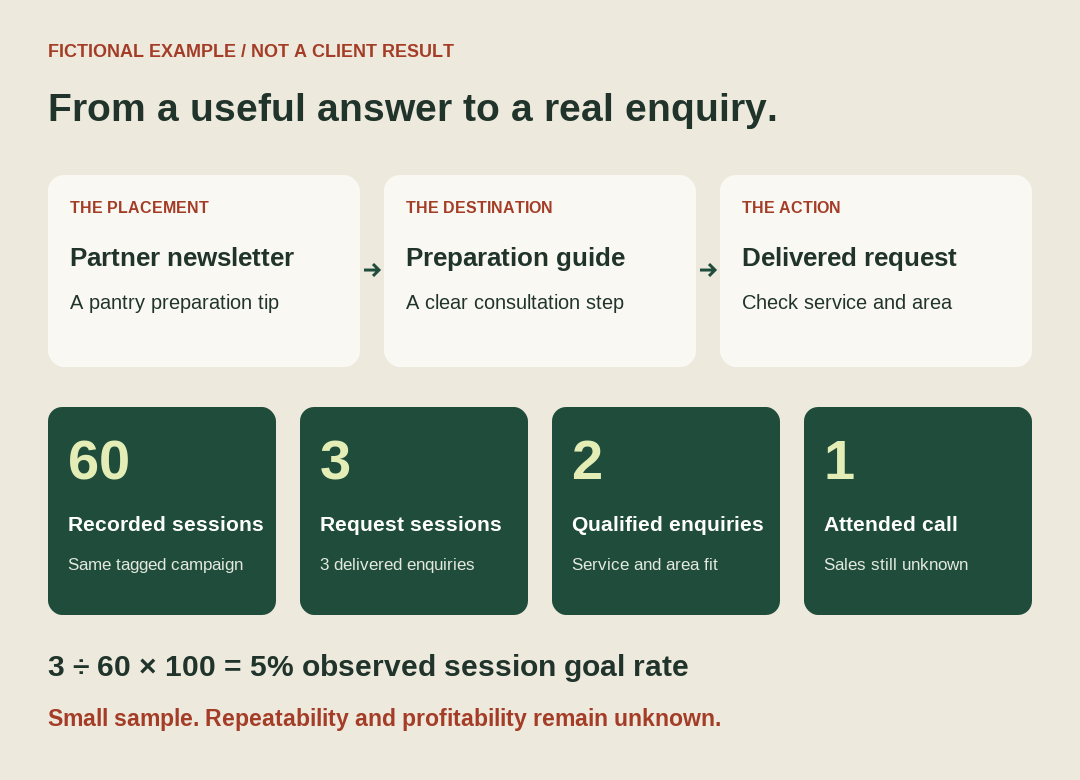
| Measure | Example count | How it was checked |
|---|---|---|
| Tagged page sessions | 60 | Same campaign, page and date range |
| Sessions with a completed request | 3 | Confirmed success event, once per session for this measure |
| Delivered, distinct enquiries | 3 | Inbox records; tests excluded |
| Qualified enquiries | 2 | Two match the service and area; one is out of area |
| Attended consultations | 1 | Booking and attendance record |
| Sales / revenue | Unknown | No confirmed sale recorded for this example |
Five percent of the recorded sessions contained the selected request event. That is an observed rate for this fictional small sample, not a benchmark or target.
The useful lesson: the partner reached some suitable people, but one enquiry was outside the service area. The next test is to make that area clearer beside the request button and repeat a comparable placement if the partner agrees.
What remains uncertain: whether the same result will repeat, how many visits tracking missed, and whether the enquiries will become customers. With a zero baseline, percentage traffic growth is undefined. Report the absolute change instead.
Record the time and money spent too. A free channel still uses time. This example provides no evidence of profitability.
SMALL ENOUGH TO FINISH
Your first 30 days, step by step.
Choose & prepare
Name the audience and goal. Improve one existing guide. Test the phone layout, enquiry delivery and tracking.
Output: one ready page.Make the first share
Choose one suitable channel. Prepare a useful message and a campaign link. Record where and when it appears.
Output: one documented placement.Answer & refine
Respond to genuine questions. Share a distinct example or checklist where welcome. Fix a demonstrated point of confusion.
Output: a clearer answer.Review & decide
Check sessions, completed requests, qualification and time spent. Continue, change one element or stop the test.
Output: one evidence-based next move.If activity is too low to judge, say so and extend the observation period. Thirty days organizes your work; it does not set a deadline for SEO results.
Use the free experiment worksheet →
Printable, no email required. Fill it out on paper or use your browser’s Save as PDF option.
MAKE THE NEXT DECISION
What if it is not working yet?
| What you observe | Check first | Next action |
|---|---|---|
| No recorded visits | Was the placement published? Does the link work? Does tracking record a test? | Fix delivery or measurement before replacing the article. |
| Search impressions, no clicks | Actual queries, page fit, position, device and country | At low positions, improve a precise answer and relevant internal links. If well placed, examine the title and result presentation too. |
| Visits, no requests | Audience fit, clarity, service area, form and confirmation | Ask a few relevant people where they hesitate. Fix one demonstrated issue. |
| Requests, poor fit | Which need and location did the message imply? | Clarify suitability before the form. |
| Good enquiries, no bookings | Response time, follow-up, availability, offer and buying cycle | Review the next step with the prospect’s questions in mind. |
A bounce rate or a short visit alone does not diagnose the problem. Someone may get the answer quickly. Look at the purpose of the page and the verified action.
BUILD DEPTH AROUND THE SAME PROBLEM
What should you publish next?
Choose the next article from a question real readers ask. Add a specific example or reusable tool, then link it to the relevant next step.
- “Why does my website get impressions but no clicks?” Show a query-and-page review with the date range and limitations.
- “How do I tell real prospects from my own test visits?” Demonstrate one traffic-quality review and explain what remains unknown.
- “Which community or partner should I choose first?” Use a worksheet comparing audience fit, access, time and a useful contribution.
- “How do I track an enquiry instead of just a button click?” Show the successful form, confirmation and analytics check on a named setup.
- “What should I change when visitors do not enquire?” Annotate one service page before and after, with a hypothesis and follow-up results when available.
- “Did visits from ChatGPT or another assistant lead to anything useful?” Review identifiable referrals and completed actions while stating the attribution gaps.
Start with the existing social media from zero guide, article repurposing guide and 30-day traffic plan. Improve and connect relevant material before creating overlapping pages.
What else helps besides publishing?
- Put this guide on the homepage and in your most relevant existing articles.
- Turn one worked example into a short screen recording or carousel that teaches something on its own.
- Offer the worksheet without a signup barrier; add an optional, clearly described newsletter only when you can deliver it consistently.
- Build one relationship with a community organizer or complementary service provider.
- Publish an honest follow-up to a real test, including a zero or inconclusive result when that is what happened.
OPTIONAL HUMAN HELP
Let’s choose your first useful traffic experiment.
Bring your website, the people you want to reach and the action you want them to take. Starting with no analytics is fine. In a Traffic Working Session with Ashley, work through one page and one bottleneck, then leave with a focused experiment and a review plan.
Prepare my free traffic brief →The brief is free. The service page offers a free 15-minute fit call; scope, duration and pricing for paid work are agreed before booking. Implementation is separate unless included in your written scope.
References & editorial notes
This guide’s channel choices and 30-day schedule are practical recommendations. The fictional business and numbers illustrate the method; they are not promises of rankings, visitors, enquiries or revenue.
- Google Search Central: SEO starter guide
- Google Analytics: campaign URLs
- Google Analytics: measuring lead-form key events
Reviewed November 11, 2026. Product interfaces and reporting availability can change.