Your website growth, shown step by step
See what to do.
Then make it yours.
A practical walkthrough for turning a website visit into a useful next step. Follow the example, then apply it to your own business.
Four focused steps · Work at your own pace · No account required

A local home organizer wants visitors to request a consultation. The example below shows a possible process—not a real customer, campaign or measured result.
Step 01 / Choose
Decide what a useful visit should lead to.
Give your website a specific job. “Get more traffic” is too broad to tell you what to change or whether it helped.
- Choose one person and problem.
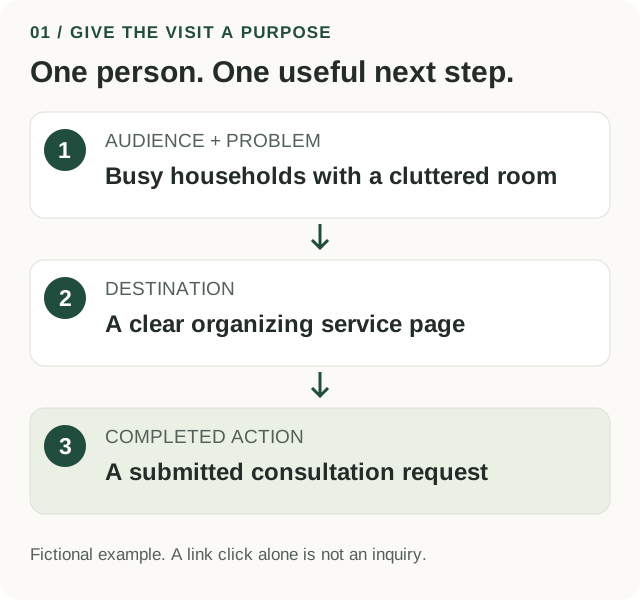
For our home organizer: busy households that want help making a room easier to use. Use your real customer conversations to make this specific.
- Choose one completed action.
A submitted consultation request is the goal. A click on the contact link is only a step toward it.
- Write a clear one-sentence plan.
“Help busy households understand our organizing service and request a consultation from the service page.”
You can name the audience, the destination page and the completed action in one sentence.
Make it practical
Use this fill-in template
I help [specific people] with [specific problem]. My page explains [offer]. The useful next action is [completed action].
What should I watch out for?
If you choose several audiences, offers and goals at once, you will struggle to tell which change helped. Keep your first test small enough to explain in one sentence.
Step 02 / Improve
Make the page easy to understand on a phone.
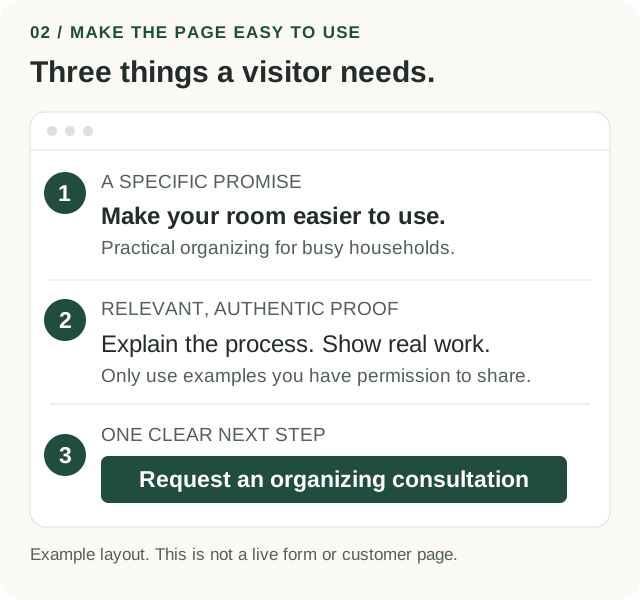
The visitor should know what you offer, why it may fit and what happens after they take action.
- Check the promise at the top.
Say who the service is for and what it helps them do. Replace a vague headline such as “Welcome” with a useful explanation.
- Put proof beside the decision.
Add an accurate example, a clear description of the process or a customer comment you have permission to use. Do not invent reviews or results.
- Test the entire next step.
Tap the main link, complete a clearly marked test inquiry and check the confirmation and delivery. For a purchase flow, use the platform’s test mode; avoid accidental charges.
A new visitor can explain the offer and complete the next step without you guiding them.
Make it practical
A clearer action label
Instead of “Click here,” try “Request an organizing consultation.” Explain whether it is free or paid, what information is needed and what happens next.
What should I watch out for?
A polished page can still have a broken form. Check both the visitor confirmation and whether the request reaches the right place. Remove unnecessary questions and explain any sensitive information you genuinely need.
Step 03 / Share
Share one useful answer in one relevant place.
Match the message to the audience and make the destination easy to recognize later. Start with a channel you can manage well.
- Choose a suitable channel.
For an opted-in email list, send a helpful tip. In a community, read the rules and contribute before sharing a link. For a partner, agree on the resource and responsibilities first.
- Give people a useful reason to visit.
Our organizer could share three ways to prepare a room for an organizing session, with a relevant link to the service page. Keep the promise consistent across the message and page.
- Label the link and record the date.
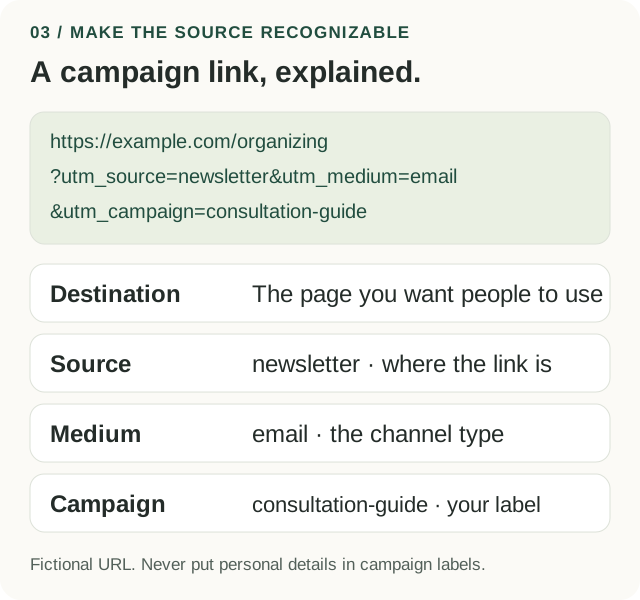
Use the campaign-link builder in My weekly plan. Use simple, consistent labels for source, medium and campaign; never put customer names or emails in a URL. Open the finished link before sharing.
You have one helpful message, a working destination, a recognizable campaign link and a review date.
Make it practical
A message you can adapt
Before an organizing session, choose one room, note the frustrating spots and decide what you want to use the space for. Our service page explains the process and how to request a consultation.
What should I watch out for?
Campaign labels help group visits; they do not prove causation or identify every visit. Consent settings, sharing, blocked tracking and attribution rules can change what appears in your reports.
Step 04 / Review
Look at the outcomes, then choose the next move.
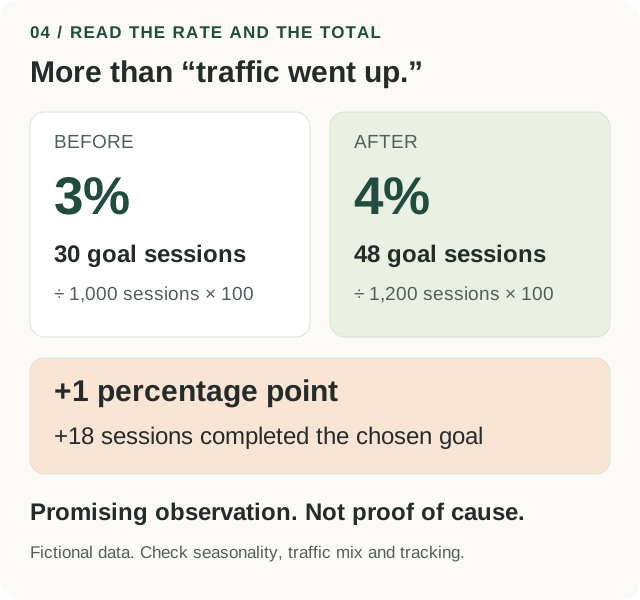
More visits are useful when they help the right people complete a meaningful action. Read the rate and the total together.
- Use comparable information.
Compare equal time windows with the same page, channel and goal definition. Note promotions, seasonality and tracking changes that could affect the result.
- Enter sessions and sessions with the goal.
Use the same report scope for both counts. One session can trigger several events, so raw event totals are not a substitute for sessions containing the chosen goal.
- Record a decision and its reason.
If the numbers look promising, repeat or test more carefully. If they fall, inspect the journey and traffic mix. If counts are small, gather more evidence and use customer feedback.
You have recorded what changed, what you observed, what remains uncertain and one next action.
Make it practical
A useful review note
“The observed rate rose from 3% to 4%, with 18 more goal sessions. We also sent an email, so we cannot isolate the page change. Next: check inquiry quality and repeat the review with consistent filters.”
What should I watch out for?
This before-and-after example is not a controlled experiment. It cannot establish that the page edit caused the change. A rate without enough observations, or without the total outcomes and cost, can be misleading.
Use the same process for your business
Different offers. The same clear thinking.
| Business | Useful page | Clear next step | Outcome to review |
|---|---|---|---|
| Local service | Service and coverage page | Request a project quote | Completed, relevant inquiries |
| Online shop | Product page | Choose an option and buy | Completed purchases and returns |
| Consultant | Specific service page | Request a consultation | Qualified bookings that attend |
| Creator or educator | Useful resource or course page | Subscribe or enroll | Confirmed signups or enrollments |
Measurement references: Google Analytics traffic-source scopes and session and session key event rate definitions.